/// iOS DEV
XcShip
Ship iOS apps to the App Store in one click.
/// Screenshots



Why XcShip exists
If you ship iOS apps, you already know the loop. Open Xcode, archive. Switch to the Organizer. Wait. Distribute. Wait. Open App Store Connect in a browser tab. Refresh the build list. Watch the "Processing" spinner. Refresh again. Paste the description from your notes app. Re-upload screenshots that App Store Connect quietly rejected for dimension reasons. Pick a build from a dropdown. Submit. Then refresh App Store Connect for the next two days to find out whether the review state moved.
Indie developers and small studios lose hours per release to this. Not because the work is hard — because it's spread across three apps and a browser, and there's no single place that tells you what stage a given build is at.
XcShip is that single place.
What you can do with it
- Pick an app from a list and click Ship It. XcShip drives the entire pipeline: pre-flight checks (signing identity, provisioning, tooling versions), build-number bump,
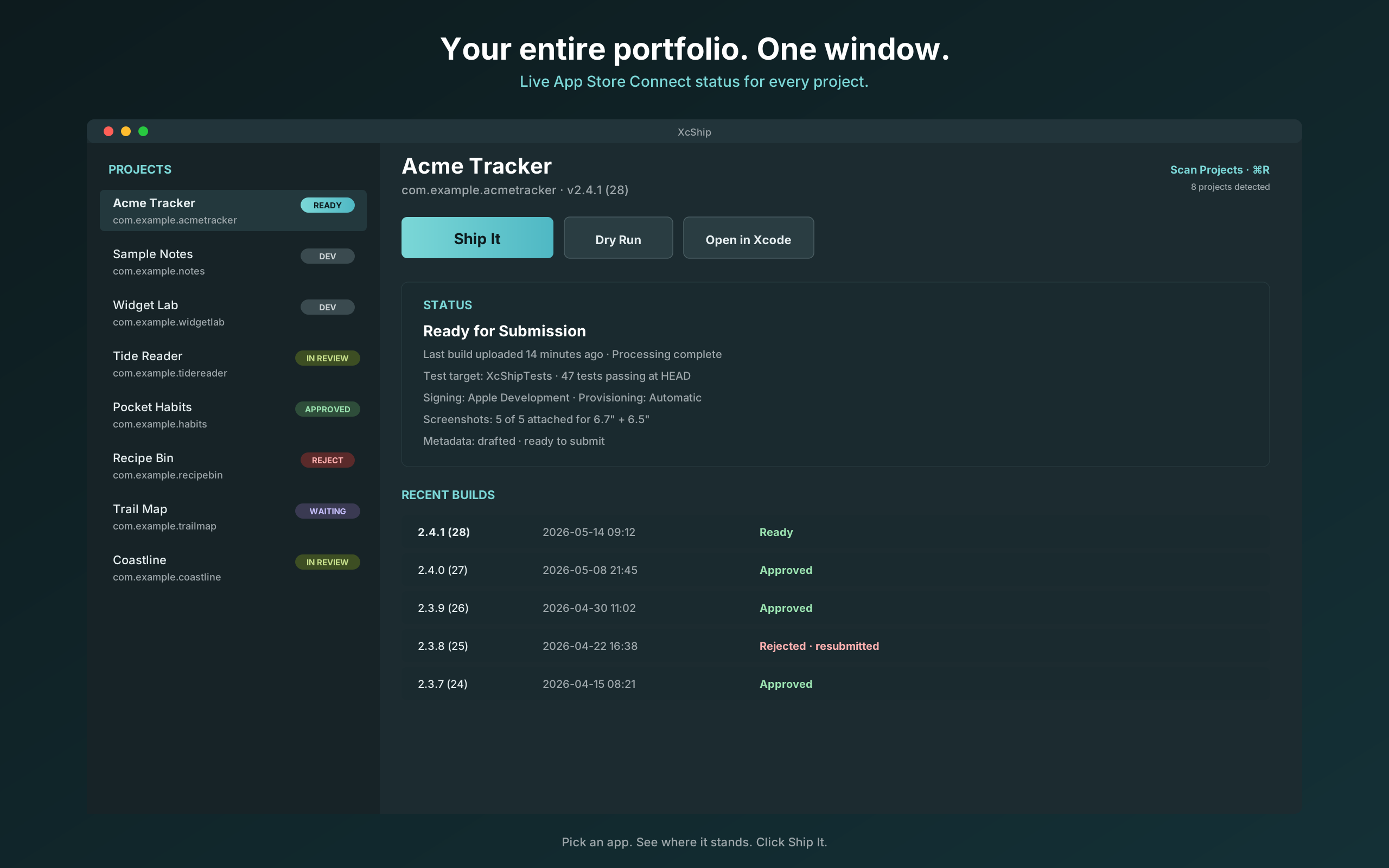
xcodebuildarchive,.ipaexport, upload to App Store Connect, poll until processing finishes, ensure the App Store version record exists, generate description and keywords and release notes via your local Claude Code, write the metadata to App Store Connect, upload the screenshots, attach the build to the version, submit for review. - See every app's current state at a glance. The sidebar lists every Xcode project in your
~/developer,~/Documents, and~/Projectsfolders, each with a live status badge: In Development, Ready for Submission, Waiting for Review, In Review, Approved, Rejected. Status is fetched from App Store Connect on launch and refreshable on demand. - Watch builds in real time. When a pipeline is running, a sheet shows the staged progress (Build & Upload → Metadata & Screenshots → Submission & Review), a live
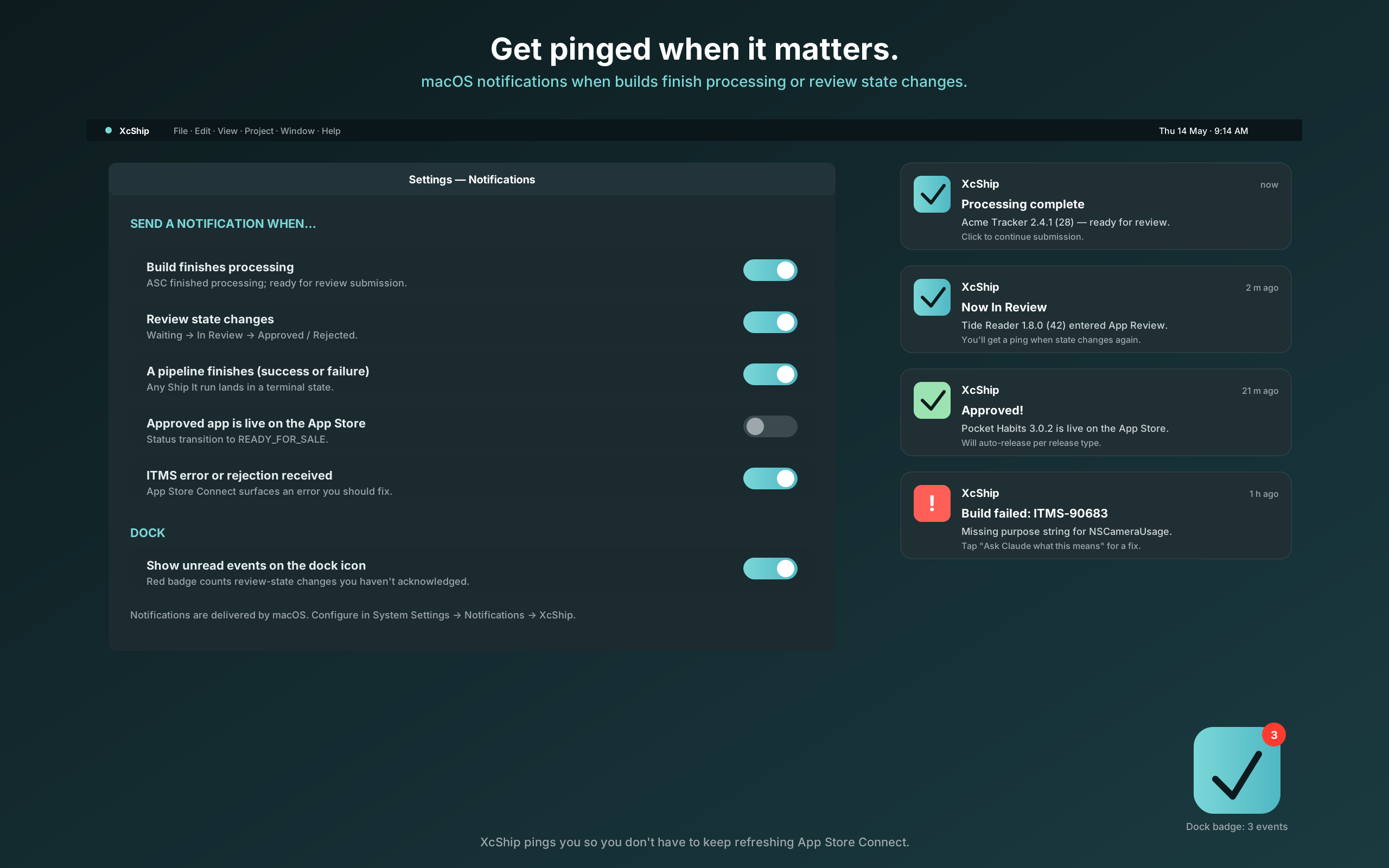
xcodebuildlog pane, an elapsed-time clock, and an ETA. Sparkle-style notifications fire when processing finishes or when App Store Connect changes review state — even when XcShip is in the background. - AI-assisted metadata, on your machine. XcShip shells out to your locally installed Claude Code to draft description, keywords, and release notes from your app's recent commits and README. The text is yours to edit before it goes to App Store Connect. No metadata ever transits a third-party server.
- Side-by-side screenshot diff. Before uploading, see last release's screenshots next to this release's. Catch the broken layout before Apple does.
- First-run auto-detect. XcShip scans your Mac for signing identities, Team IDs, and
.p8API keys in~/.appstoreconnect/private_keysand~/Downloads. The only field you usually have to paste in is the Issuer ID.
Built for
Indie iOS developers and small studios shipping their own apps to the App Store. Not a CI server, not a fastlane replacement for large teams — a single-developer Mac app that does the day-to-day "I want to ship this build now" loop without context-switching.
Privacy and trust
Everything stays on your Mac. XcShip's only network calls are to Apple's App Store Connect API, Gumroad's license-verification endpoint, and the local claude subprocess on your own machine for metadata generation. No telemetry, no analytics, no crash reporters phoning home.
Your App Store Connect API key, your signing identity, and your XcShip license live in your macOS Keychain. The .p8 private key is read from disk when XcShip needs to sign a JWT for the Apple API, then discarded from memory.
XcShip is Developer ID signed and notarized by Apple. It is not distributed through the Mac App Store — sandboxing would forbid the subprocess spawning and disk scanning the app fundamentally requires — but you get the same gatekeeper-verified install experience as Sketch, Tower, Things, Bear, and most professional Mac apps.
Get the app
- 14-day free trial, every feature unlocked.
- One-time purchase: $49 from Gumroad. No subscription.
- macOS 14 (Sonoma) or later. Xcode + Command Line Tools required. App Store Connect API key required.
Copyright © 2026 NYRAI LLC. All rights reserved.
© 2026 NYRAI LLC. All rights reserved.